What is Business Process Automation?
Understanding BPA and how it represents the ultimate evolution of document management, transforming entire business operations beyond simple digitization.
Understanding Business Process Automation
Business Process Automation (BPA) uses technology to execute recurring tasks or processes in a business where manual effort can be replaced. It is done to minimize costs, increase efficiency, and streamline processes. BPA transforms how local organizations handle their daily operations by eliminating manual, time-consuming tasks and replacing them with intelligent, automated workflows.
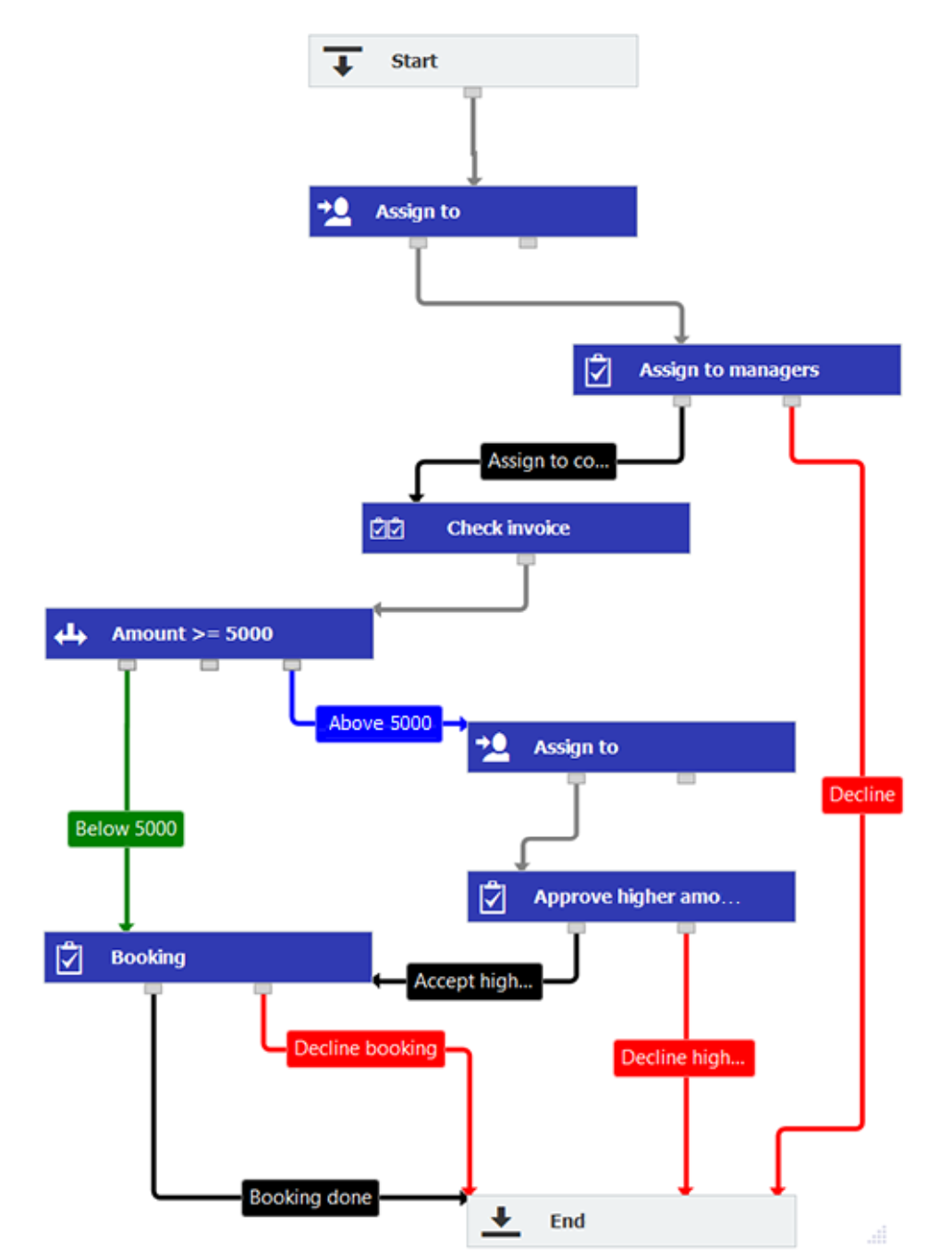
Unlike simple task automation, BPA orchestrates complete end-to-end processes involving multiple departments, systems, and stakeholders. For example, a purchase order process automated with BPA would automatically route the PO through budget verification, multi-level approvals, supplier notification, receiving confirmation, and invoice matching—all without manual intervention.
The result is a more efficient organization where employees focus on strategic activities that drive business growth, customers receive faster service, and management has real-time insights into business operations. With BPA handling routine tasks, your organization can scale operations without proportionally increasing administrative overhead.
The Evolution to BPA
Paper-Based
- • Physical filing cabinets
- • Manual routing
- • Email attachments
- • No visibility
- • High error rates
Digitized
- • Digital storage
- • OCR searchable
- • Basic retrieval
- • Still manual routing
- • Some efficiency
Collaborative
- • Team access
- • Manual approvals
- • Email notifications
- • Some integrations
- • Better visibility
BPA (Ultimate)
- • Intelligent routing
- • Auto-approvals
- • Business rules
- • Full integration
- • Real-time analytics
What Makes BPA Different
End-to-End Automation
BPA automates complete business processes from start to finish, not just individual tasks.
Example: Invoice Processing
- 1. Auto-capture invoice data (no data entry)
- 2. Match with PO and receiving (automated)
- 3. Route for approval based on amount (rules-based)
- 4. Escalate if overdue (intelligent)
- 5. Post to accounting system (integrated)
- 6. Archive with BIR compliance (automatic)
Business Rules Engine
Define complex logic that makes decisions automatically based on your business policies.
Example: Approval Rules
- • < ₱10,000: Auto-approve
- • ₱10,000-50,000: Manager approval
- • ₱50,000-200,000: Director approval
- • > ₱200,000: CFO + CEO approval
- • Budget overrun: Add Finance review
- • Preferred vendor: Skip additional checks
System Integration
BPA connects all your business systems to create seamless data flow and eliminate duplicate entry.
Typical Integrations:
- • ERP (SAP, Oracle, Microsoft Dynamics)
- • Accounting (QuickBooks, Xero)
- • CRM (Salesforce, HubSpot)
- • HR Systems (Workday, BambooHR)
- • Email platforms (Outlook, Gmail)
- • E-signature services
Process Analytics
Real-time visibility into process performance with metrics and dashboards for continuous improvement.
Key Metrics Tracked:
- • Average cycle time per process
- • Bottleneck identification
- • Approval turnaround times
- • Exception rates and types
- • Cost per transaction
- • Compliance adherence rates
The Business Case for BPA
Processes that took days now complete in hours
Less manual work, fewer errors, reduced overhead
Typical payback period for BPA investment
Hard Benefits
- ✓ Reduced headcount needs through automation
- ✓ Eliminated overtime and expediting costs
- ✓ Lower error correction and rework expenses
- ✓ Reduced compliance penalties and fees
- ✓ Faster invoice processing captures early payment discounts
Soft Benefits
- ✓ Higher employee satisfaction and retention
- ✓ Faster customer response times
- ✓ Improved audit readiness and compliance
- ✓ Better management visibility and control
- ✓ Scalability without proportional cost increase
Common BPA Use Cases
Accounts Payable Automation
From 3 days to 3 hours for invoice processing
- • Auto-capture invoice data with AI
- • 3-way match with PO and goods receipt
- • Intelligent routing based on amount and type
- • Exception handling for mismatches
- • Auto-posting to accounting system
Employee Onboarding
From 2 weeks to 2 days for complete onboarding
- • Document collection from new hire
- • Automated 201 file creation
- • Task assignment to IT, HR, Finance
- • Equipment and access provisioning
- • Compliance tracking and reporting
Contract Management
From 10 days to 2 days for contract execution
- • Template-based contract generation
- • Multi-party review and approval
- • E-signature collection from all parties
- • Automated renewal notifications
- • Obligation tracking and alerts
Purchase Order Processing
From 5 days to same-day PO approval
- • PR to PO conversion with vendor matching
- • Budget verification against department limits
- • Multi-level approval routing
- • Automatic supplier notification
- • Receiving and payment matching
Local DocuWare BPA Implementation
Business process automation transforms how local organizations handle their daily operations by eliminating manual, time-consuming tasks and replacing them with intelligent, automated DocuWare workflows. Rather than spending hours on repetitive document processing, your team can focus on strategic activities that drive business growth.
DocuWare automation platform goes beyond simple document storage to create intelligent workflows that understand your business rules, route documents to the right people at the right time, and ensure nothing falls through the cracks. From invoice processing to employee onboarding, DocuWare automation reduces errors, accelerates processes, and provides complete visibility into every step.
The result is a more efficient organization where employees are empowered to do their best work, customers receive faster service, and management has real-time insights into business operations. With DocuWare automation handling routine tasks, your organization can scale operations without proportionally increasing administrative overhead.
DocuWare Analysis & Planning
- • Document type analysis per department
- • Current DocuWare workflow assessment
- • Index schema creation
- • Access rule definition
- • DMS implementation roadmap
DocuWare Implementation
- • DocuWare configuration
- • DocuWare workflow automation setup
- • Integration with existing systems
- • Security implementation
- • User access configuration
DocuWare Training & Support
- • Comprehensive user training
- • DocuWare administrator training
- • On-premise hypercare support
- • Documentation provision
- • Ongoing DMS technical support
BPA: The Ultimate Evolution
Our 4-tier service model is designed to progressively build your organization's capabilities toward full BPA. Each level adds capabilities, with Level 4 delivering complete business process automation.